~/.claude/
- This is a directory at the root directory of your computer.
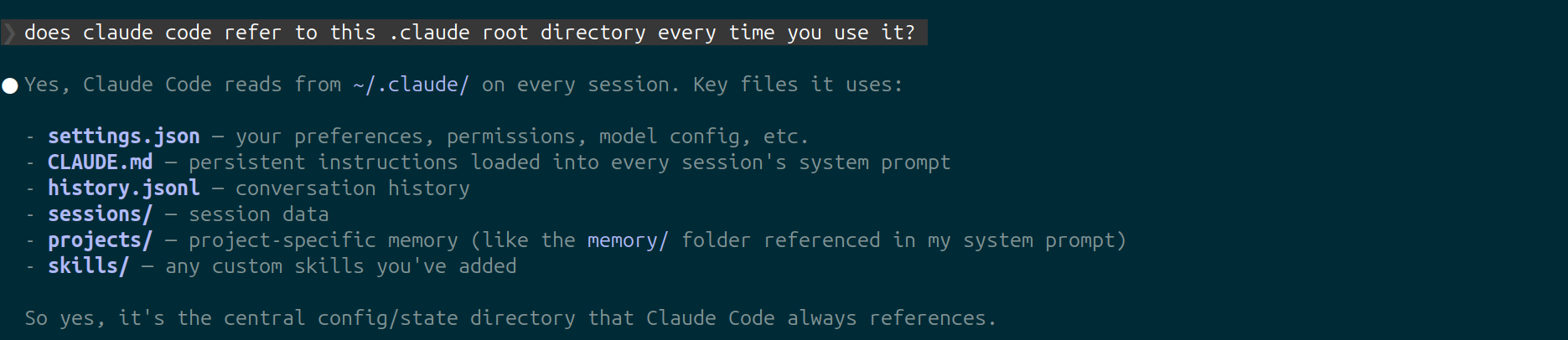
- See above ss for other things it contains
- It contains a default
CLAUDE.mdthat gets invoked in every Claude Code session - You can also create a directory for agents in this
.claude/directory - Also you can create a
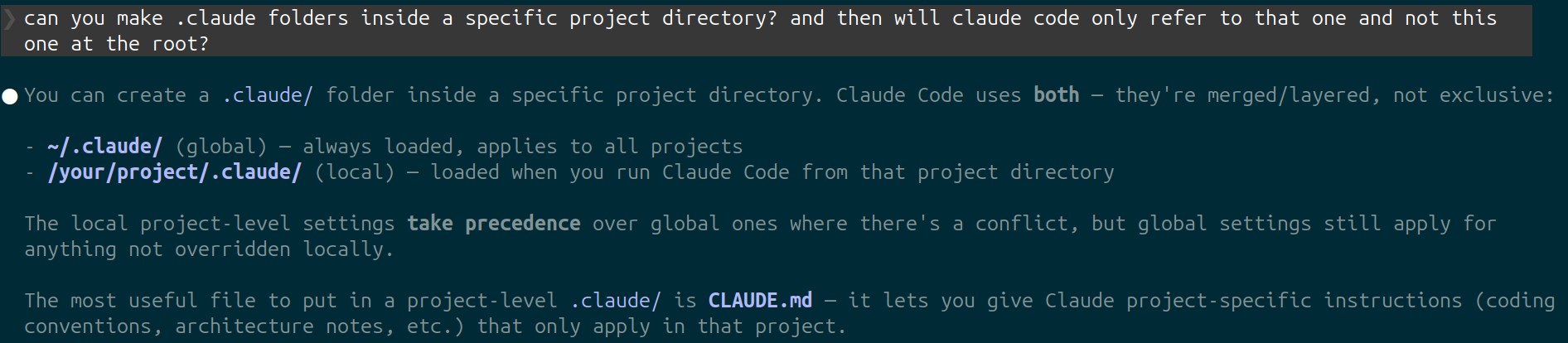
.claude/folder inside specific projects as well, along with a project specificCLAUDE.mdfile- project level
.claude/or user level.claude/.
- project level
CLAUDE.md
CLAUDE.mdcontains persistent instructions loaded into every Claude Code session's system prompt — tells Claude how to behave, your preferences, workflows, and project conventions.- Global by default (~/.claude/CLAUDE.md), but you can also place one inside a project folder to give Claude project-specific context
- You can have multiple
CLAUDE.mdfiles in the same project, in different directories for example.
- You can have multiple
MCP Servers
- MCP = Model Context Protocol
- MCP is a standardized way for AI tools to communicate with different integrations/tools, like: your notetaking app, Supabase, Stripe, Firebase, your backend db etc..
- Example MCP server: context7 which is a mcp server that searches over documentations(it’s like a search engine for documentation) instead of having Claude Code fetch the url and look for relevant projects that way, but this is more efficient.
- So you can just tell Claude Code to use context7 to research documentation!
- Adding an MCP server to Claude
- Just something like: “claude mcp add…” (this is in the CLI outside of the Claude Code prompt text box), 90% of MCPs will simply give you the terminal command — but you may have to tweak it a little to make it work eg: adding api keys etc.
claude mcp listclaude mcp add ...
- You can add MCP servers
- at user level (
~/.calude/in root dir) — available on every project you have on your computer - at project level (
.calude/in the current project) — available only in current project
- at user level (
- You can add MCP server using HTTP, SSE (this may be deprecated) or local stdio server.
- 90% of mcp servers are http by default
- A lot of plugins have mcp servers bundled up within them, or they are literally just a mcp server(the only difference is they are added and edited with the
/pluginscommand and not the/mcpcommand).
Subagents
- The main Claude code conversation agent can spawn other more specialized subagents.
Some Default Subagents that come with Claude Code:
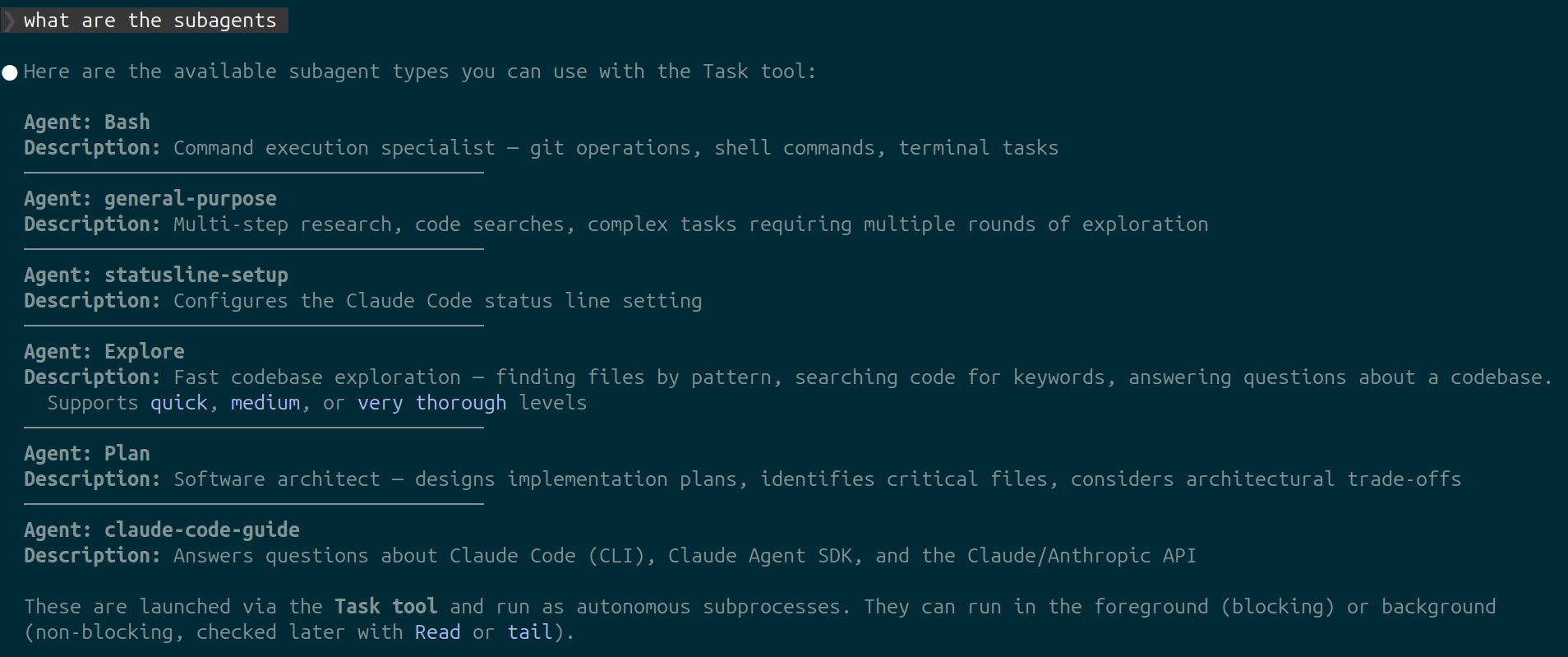
- Subagents have their own context window. !! But they still count towards your overall token usage !!
- The subagents using their own context window is the biggest benefit of using these, because it doesn’t pollute and take up room in your main context window with redundant unimportant information.
- You can pair subagents with: skills, hooks and MCP servers.
- Using subagents in Claude code:
- You can find and use your subagents with the “@” in the text window or you can just prompt Claude code, “use the git specialist agent” etc.
- so all you need to do is tell you main Claude code agent to use a subagent.
- Some times Claude codes main agent will use subagents on its own, but that’s rare and usually if you want it to use a subagent, explicitly tell it.
- Creating your own subagents:
- use the built in Claude Code interface
- use the
/agentscommand and then chose create new agent, and then do the steps it prompts you. — In this method Claude Code will create the subagent for you.
- use the
- Manually creating subagent:
- navigate to the
.claudefolder either at a project level or root level, and then add subagents in the form of.md(markdown) files in theagents/directory.
- navigate to the
- Plugins can have subagents as well
- Look at the plugins section below!
- use the built in Claude Code interface
(you may need to restart Claude Code after adding a new subagent .md, to see it when you use the /agent command)
Skills
- Skills are a “training document” for Claude Code.
- Skills used to be saved in a
.mdfile (like a pre-written prompt) and could be invoked through a slash command to access it in the Claude Code interface.- But they merged this and made it slightly more powerful to skills, where it’s now more customizable and more powerful.
💡
"Skills are modular, self-contained packages that extend Claude's capabilities by providing specialized knowledge, workflows, and tools. Think of them as "onboarding guides" for specific domains or tasks—they transform Claude from a general-purpose agent into a specialized agent equipped with procedural knowledge that no model can fully possess."
- There are 2 types of skills:
- Reference skill
- Specialized knowledge & preferences that Claude Code will not have — your telling Claude code how you like to do things basically.
- Tasks skill
- step-by-step instructions
- Reference skill
(These two skills classes are not black and white and you can skills that are both)
-
Creating skils:
- In your
.claude/directory (either root or project specific) create askills/directory and then in this make directories for each specific skill you want to add<skill1>/and in that add aSKILL.md(this.mdis required, it’s the main file you need) - you can also add supporting files in your
<skill1>/directory like aexamples.mdthat shows examples of how to do a specific thing to support your mainSKILL.md
⚠️
ALSO they say you should keep your
SKILL.mdfiles under 500 lines!!- if you absolutely need to add more info, break it up into multiple files.
- In your
-
Creating
SKILL.mdfile:- There are 2 parts to a
SKILL.mdfile:- frontmatter
- This is everything at the top between the “- - - ” dashes
- This is where you name & describe the skill
- The description is especially important because the main Claude Code agent will not load the entire skill to determine whether it needs to run it.
- When Claude Code main agent wants to decide whether to use a skill or not it only loads the frontmatter to make a descision. — Nice from a token perspective!
- The actual skill
- This is everything after the frontmatter
- frontmatter
- There are 2 parts to a
-
Invoking/using a skill:
- Automatic
- Claude Code can automatically use a skill — especially if you explicitly tell it to use a skill in the prompt.
- and sometimes Claude Code main agent will pick up on using a skill on its own without you needing to explicitly tell it to
- Trigger using slash command
- you can run the skill through a custom slash command
- Automatic
Plugins
- Plugins are just skills, hooks and agents that you can bundle together.
- The main reasons to use plugins is:
- To share with other people (it’s easily shareable)
- There’s a marketplace for plugins!
- Using across multiple projects.
- To share with other people (it’s easily shareable)
Hooks
- Claude Code hooks are just event driven shell commands — a shell command Claude Code will run at certain events.
- You can view your hooks with the slash command:
/hooks - There are only so many events that can trigger hooks:
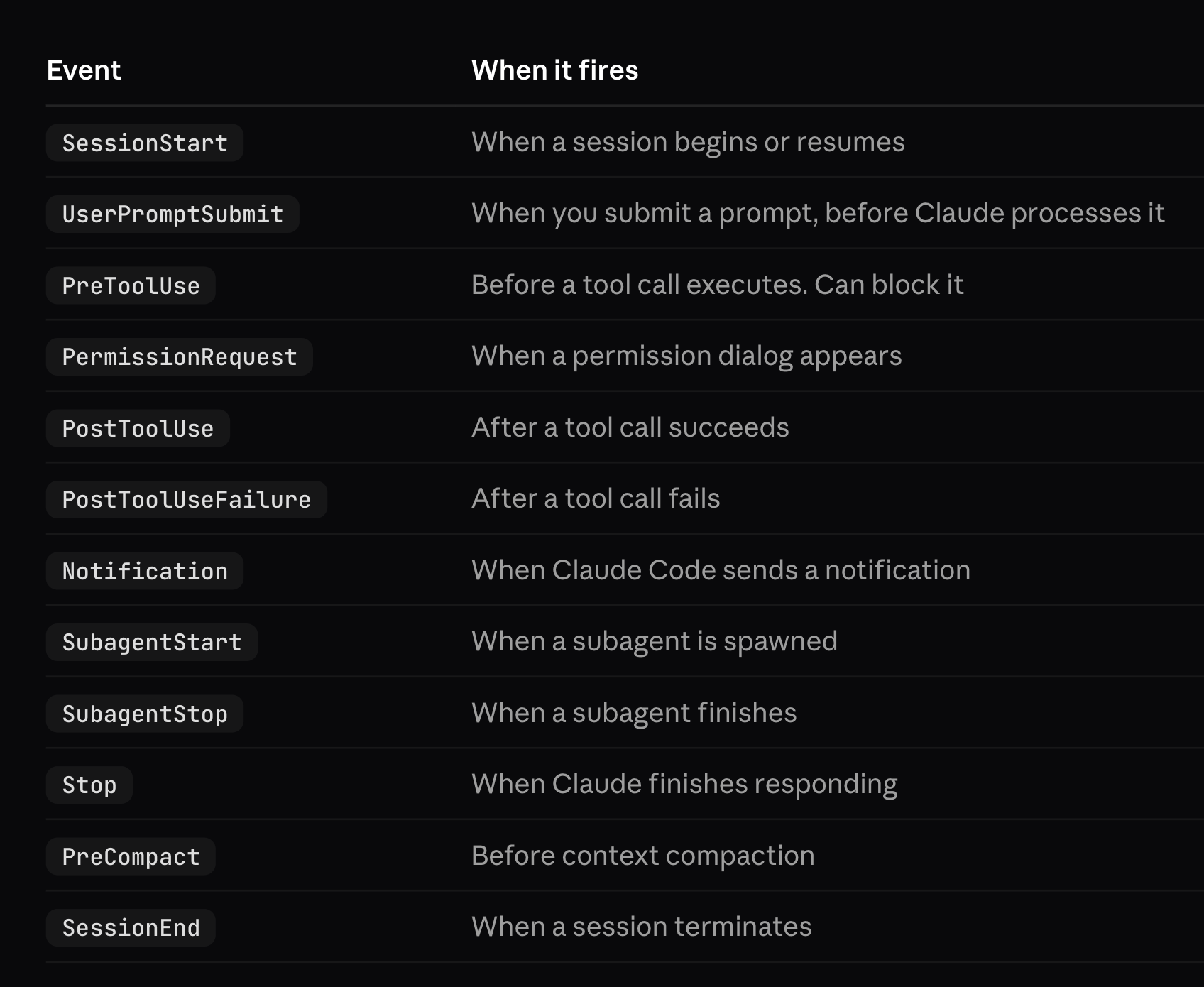
These are the only events that can trigger hooks
-
Matchers
- If you open up the settings.json in
.claude/you will see:
{ "hooks": { "Stop": [ "matcher": "", "hook": [ { "type": "command", "command": "..." } ] ], "PermissionRequest": [ "matcher": "", "hook": [ { "type": "command", "command": "..." } ] ], } }- Matchers are basically different tools that Claude Code can use like Bash commands, Read, Write, Edit, * = all of them (leaving the matchers field as empty
“”means"*") - These matchers are used to filter when you want a certain hook to run by setting
"matcher": "Write"for example.
- If you open up the settings.json in
-
Creating hooks:
/hookscommand in the prompt window and then go through the steps Claude Code shows you.- You can also manually add hooks by adding then in
setings.json(both for project & user level)- For plugins you add them in
hooks/hooks.json
- For plugins you add them in
- You can also have Claude Code create the hook for you — just tell it what you want.
/insights report
/insightsto generate a helpful report on your Claude Code usage!- It generates a nice
.htmlweb-page which is very nicely formatted with useful analytics
- It generates a nice
- Can run this from any project folder, etc.
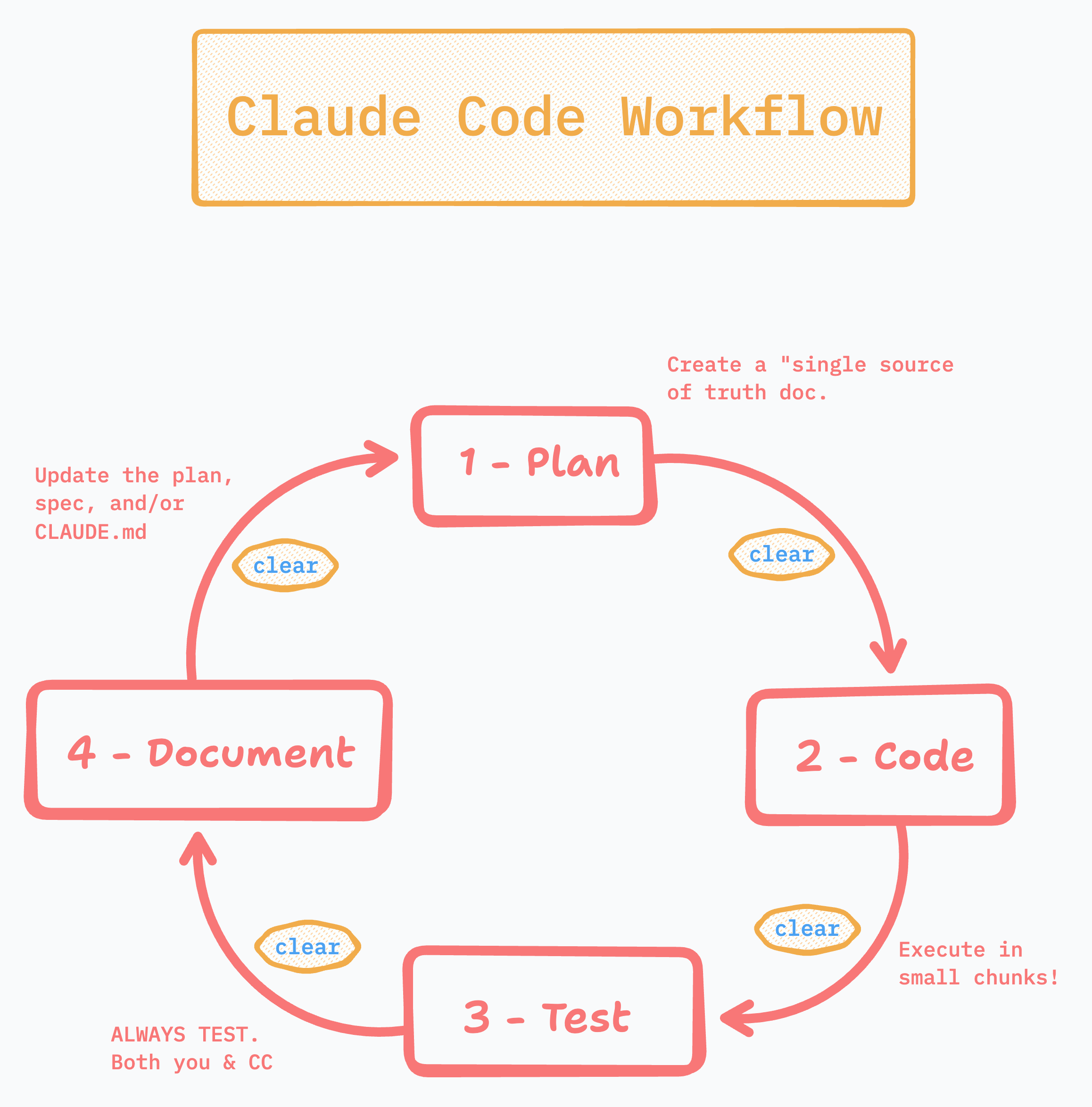
credit: https://bulletfinity.com/b/claude-code-course-6pr4d8p7o7
Links to helpful stuff:
-
These notes heavily take material from these videos: https://www.youtube.com/playlist?list=PLkD4ksZgZ-nrX6kCvfoCHJr3GyFRnbab3
-
https://www.youtube.com/playlist?list=PLkD4ksZgZ-nrX6kCvfoCHJr3GyFRnbab3
- Notes for above course: https://bulletfinity.com/b/claude-code-course-6pr4d8p7o7
CLAUDE.md
Subagents:
- https://code.claude.com/docs/en/sub-agents
- https://anthropic.skilljar.com/introduction-to-subagents
- https://github.com/VoltAgent/awesome-claude-code-subagents ← Awesome repo with lots of subagents to chose from!
Skills:
- https://code.claude.com/docs/en/skills
- https://github.com/anthropics/skills/tree/main/skills/skill-creator ←the
skill.mdfile here is the perfect guide to understand skills (by anthropic) — 5min read
Hooks:
- https://code.claude.com/docs/en/hooks-guide
- https://code.claude.com/docs/en/hooks
- https://github.com/anthropics/claude-code/tree/HEAD/plugins/hookify← A plugin that can be used to easily create hooks(or something like hooks the documentation here is a little ambiguous), it gives you a nice
/hookifycommand to create rules for yourself.
Originally written in Notion: Mann's Claude Code Notes